FTDX1200 Operating Manual Page 83

CW CONVENIENCE FEATURES Cont'd

Previous Page    Index of Topics    Table of Contents    Index of Pages    Next Page

CW DELAY TIME SETTING

During semi-break-in (not QSK) operation, the hang time of the transmitter, after you have finished sending, may be adjusted to a comfortable value consistent with your sending speed. This is the functional equivalent of the "VOX Delay" adjustement used on voice modes, and the delay may be varied anywhere 30 msec and 3 seconds via Menu item "064 CW BK-IN DELAY".


    1. Press the [BK-IN] button to enable CW transmission (Menu item "063 CW BK-IN DELAY").

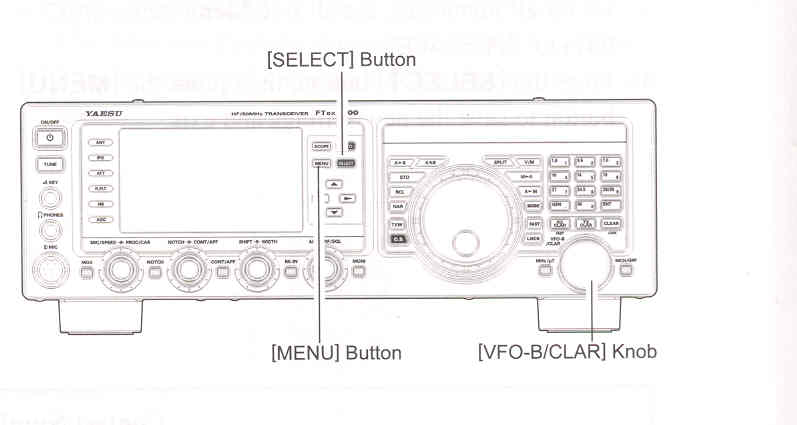
    2. Press the [MENU] button to enter the Menu mode.

    3. Rotate the [VFO-B/CLAR] knob (or press the ▲ / ▼ button) to select Menu item "064 CW BK-IN DELAY", then press the [SELECT] button.

    4. Start sending and rotate the [VFO-B/CLAR] knob to adjust the hang time, as you prefer for comfortable operation.

    5. When you are finishes, press the [SELECT] button, then press the [MENU] button to save the new setting and exit to normal operation.




End of "CW Delay Time Setting"


CW PITCH ADJUSTMENT

You may adjust the center frequency of the reciever passband, and change the pitch of your offset CW carrier, to the tone you prefer via Menu item "056 CW PITCH". The tone may be varied between 300 Hz and 1050 Hz, in 10 Hz steps.


    1. Press the [MENU] button to enter the Menu mode.

    2. Rotate the [VFO-B/CLAR] knob (or press the ▲ / ▼ button) to select Menu item "056 CW PITCH".

    3. Press the [SELECT] button, then rotate the [VFO-B/CLAR] knob (or press the ▲ / ▼ button) to select the desired tone.

    4. When you are finishes, press the [SELECT] button, then press the [MENU] button to save the new setting and exit to normal operation.


TERMINOLOGY:
CW Pitch: If you tuned to an exact "zero beat" on an incomeing CW signal, you could not copy it ("Zero beat" implies a 0 Hz tone). Therefore, the receiver is offset several hundreds of Hz (typically), to allow your ear to detect the tone. The BFO offset associated with this tuning (that produces the comfortable audio tone) is called the CW Pitch.


End of "CW Pitch Adjustment"

Cont'd Next Page "CW Convenience Features"

Previous Page    Index of Topics    Table of Contents    Back to Top    Index of Pages    Next Page

FTDX1200 Operating Manual Page 83